# Ollie, the assistant
Ask Ollie about your queue and a ticket, let it find tickets and pull numbers, and approve the changes it prepares.
Ollie is opendesk's assistant: the violet blob in the top bar. Ask it about your queue in plain words. It reads tickets, customers, help articles, views, reports and the team's workload, explains what it finds, and prepares changes for you. **Nothing changes until you approve it.**
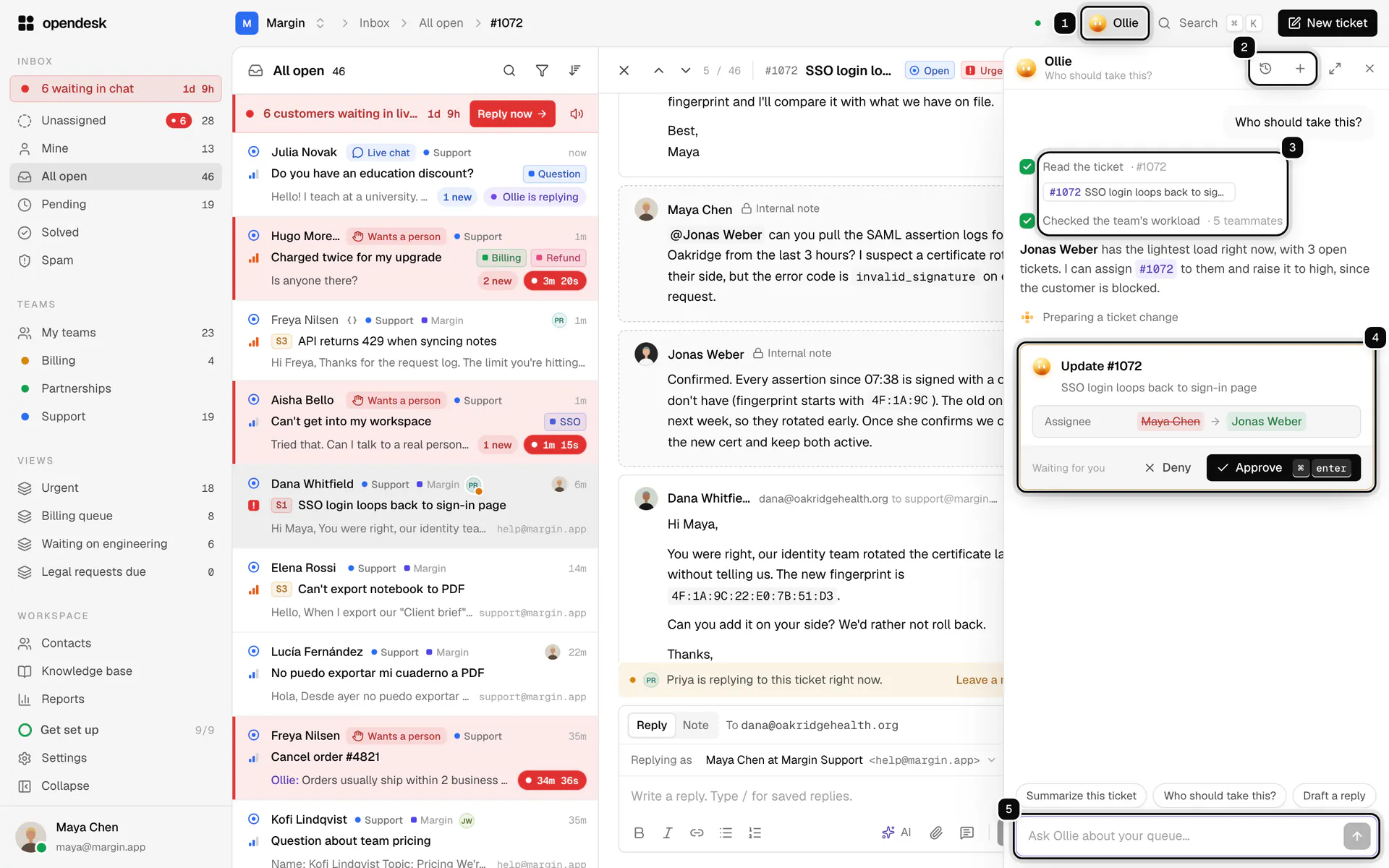
1. **Ollie**: opens and closes the panel. The shortcut is mod J; Esc closes it.
2. **Conversations** and **New chat**: your past chats with Ollie, and a fresh one.
3. **What Ollie did**: each step it took, such as reading the ticket or checking the team's workload.
4. **Approval card**: a change Ollie prepared, waiting for you.
5. **Message box**: ask anything. Type / for quick asks.
## Ask Ollie something
**1. Open Ollie**
Click **Ollie** in the top bar, or press mod J (⌘ J on macOS, Ctrl J elsewhere). Ollie knows which page and ticket you are looking at.

**2. Ask in your own words**
For example:
- "Summarize this ticket" or "Who should take this?" on an open ticket.
- "What needs my attention right now?" or "Which tickets breach SLA in the next hour?"
- "Show unassigned tickets older than a day and suggest assignees."
- "Label all billing tickets from this week."
- "Draft a reply to this customer" or "Add an internal note with what we know so far."
- "How are we doing this week?" for volume, response times, SLA and CSAT.
- "Draft a help article from recently solved tickets about the most common question."
Ticket numbers in Ollie's answers, like #123, open the ticket.
**3. Approve or deny what it prepares**
When Ollie wants to change something, it shows an approval card with exactly what will happen: each field now and after, the tickets it covers, or the full text of a reply or note. A reply that will reach a customer is marked **Sends to the customer**.
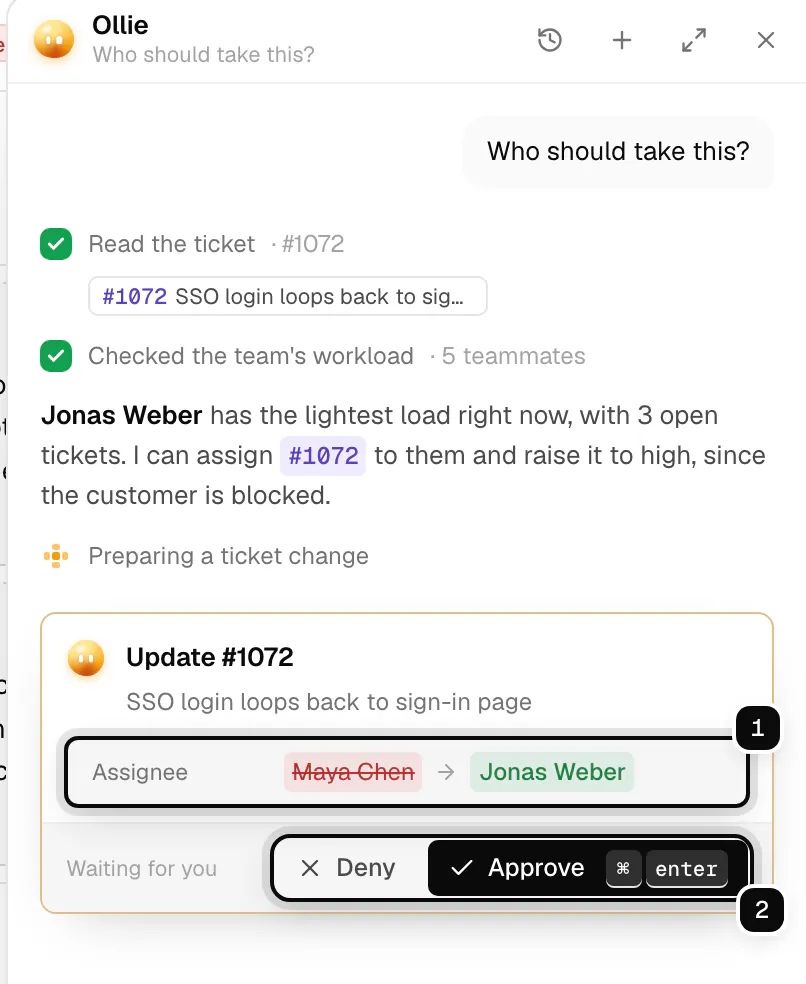
- **Approve** (mod enter) makes the change with your permissions, once.
- **Deny** leaves everything as it is, and Ollie asks what you want instead.
- Sending a new message instead skips the change.
> **Good to know**
>
> Ollie works with your own role: a viewer can ask questions but not make changes, and only admins can draft automations. An approval waits 15 minutes, then lapses.
## Ollie on a ticket
Every ticket has an **Ollie** section in its details panel. It keeps a short summary of the conversation, offers changes, and gives shortcuts into your connected tools.
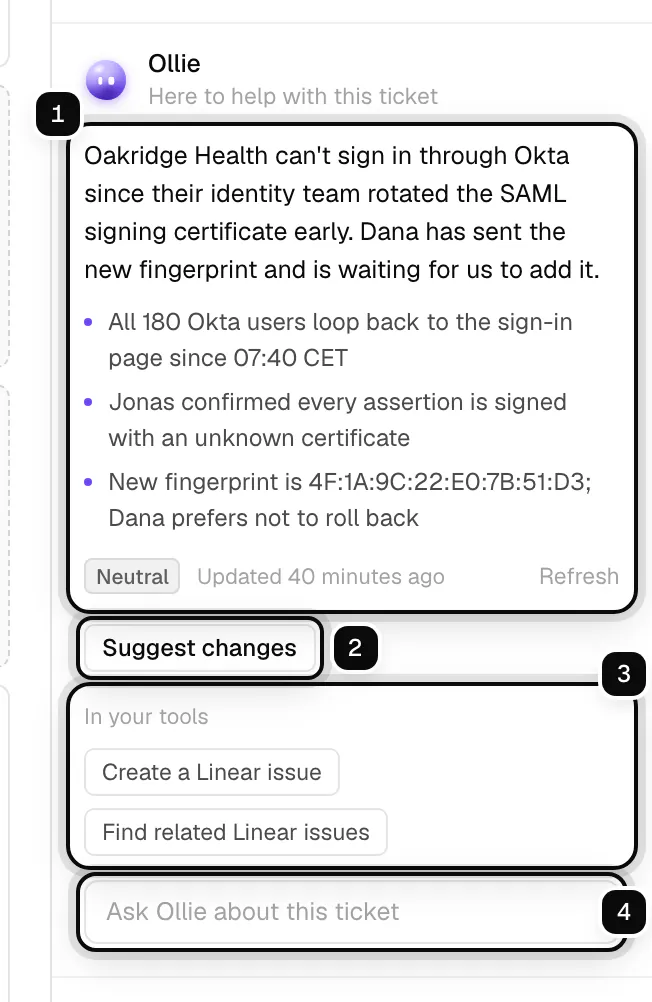
1. **Summary**: what the ticket is about, its key points and the customer's sentiment. **Refresh** writes it again.
2. **Suggest changes**: Ollie reads the ticket and proposes a priority, severity, labels or team that fit better.
3. **In your tools**: shortcuts for the products you connected, such as "Create a Linear issue". See [Integrations](/guides/integrations/).
4. **Ask Ollie about this ticket**: a question just about this conversation, answered with its sources.
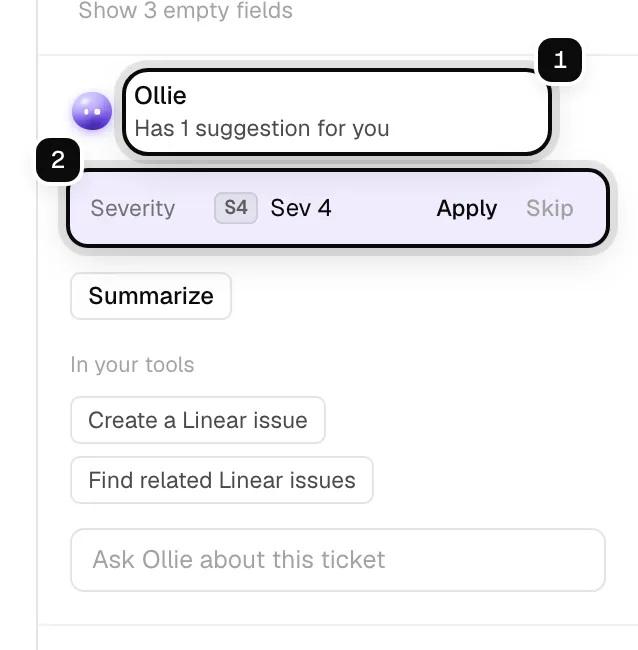
When [triage](/guides/triage-and-assignment/) is not sure enough to apply a change on its own, it leaves it here as a suggestion. **Apply** takes it, **Skip** dismisses it.
## Who did it
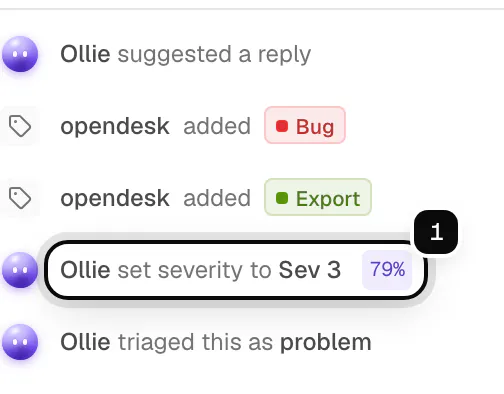
Everything the AI does in opendesk is shown as Ollie: changes you approved in the assistant, triage, drafts and AI automation actions. Chat and email answers to customers carry the name and face of the [bot](/guides/bots/) that sent them, Ollie unless you built another. A ticket's timeline reads "Ollie set severity to Sev 3" with Ollie's mark and, for triage, how sure it was. The audit log records the change as made by the AI on behalf of the person who approved it.
## Quick asks and tips
Type / in the message box for quick asks: summarize the open ticket, find who should take it, draft a reply, add an internal note, triage what needs attention, old unassigned tickets, how the team is doing, and draft a help article.
Now and then Ollie offers a short tip under the blob, such as "3 tickets breach SLA within the hour". Tips come from simple counts, not the AI, and cost nothing. They appear at most every 20 minutes, never while the panel is open. **Not now** hides one; **Pause for a week** stops them for a week.
## Conversations
Your conversations with Ollie are private to you. Open past ones from **Conversations**, rename or delete them, or start a **New chat**. The panel can sit docked beside your work or float anywhere you drag it.
## What Ollie can change
Ollie can change the assignee, status, priority, labels and fields, add notes, send replies you approved, save help article drafts and personal views, and (for admins) save automations, switched off for you to review. It prepares one change at a time.
Bulk changes cover at most 50 tickets per approval, and the tickets are fixed when Ollie proposes the change, so a ticket that arrives later is not swept in.
With [integrations](/guides/integrations/) connected, Ollie can also look things up in Linear, GitHub, Jira, Sentry, Stripe and others, and create or update things there with the same kind of approval, marked **Runs in** the product.
## Cost and settings
On opendesk Cloud, each model turn of an answer is charged to the workspace's AI balance at its real cost, about $0.024 a turn with the default model; a pricier model costs more. See [AI features](/guides/ai/#ai-usage-on-cloud).
Admins turn Ollie on or off for the workspace with **Let teammates ask Ollie** in **Settings, AI**. On a self-hosted instance Ollie needs an AI provider that supports tool use (Anthropic, or an OpenAI-compatible endpoint with tools). See [AI on a self-hosted instance](/self-hosting/ai/).
## Related
- [AI features](/guides/ai/)
- [Bots](/guides/bots/)
- [Integrations](/guides/integrations/)
- [Triage and assignment](/guides/triage-and-assignment/)
- [Assistant API](/api/resources/assistant/)